
CanvasZoomState

View as Markdown

Definition

Indicates the current state of the Zoom tool on the chart. This property reveals the state of the tool while it is in use, and does not indicate a chart is zoomed in on or not. As soon as a zoom action is completed, the tool is considered to be no longer in use.

Property Value

An enum representing the state of the Zoom tool on the chart. Possible values are listed below:

StateDescription
NoneThe Zoom tool is not currently being used
SelectedThe Zoom tool is selected, but has not yet been used to zoom in
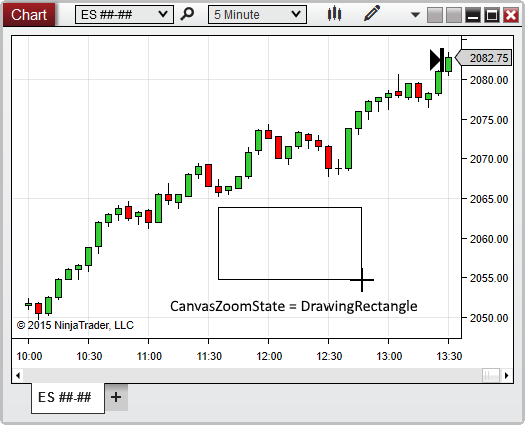
DrawingRectangleThe Zoom tool is currently in use (User is currently drawing the rectangle in which to zoom)

Syntax

\<chartcontrol\>.CanvasZoomState

Examples

1protected override void OnRender(ChartControl chartControl, ChartScale chartScale)
2{
3 CanvasZoomState zoomState = chartControl.CanvasZoomState;
4
5 // Trigger an alert while a user is zooming in on a chart
6 if (zoomState == CanvasZoomState.DrawingRectangle)
7 Alert("zoomAlert", Priority.Medium, "Make sure to zoom in on the entire chart pattern!", " ", 60, Brushes.White, Brushes.Black);
8}

Based on the image below, CanvasZoomState confirms that the Zoom rectangle is currently being drawn:
ChartControl_CanvasZoomState