Compile Errors
When compiling a custom indicator or strategy it is possible and likely that you will generate compile errors
- NinjaTrader will compile ALL NinjaScript files NOT only the file you are working on.
- A list of compile errors for all files will be displayed in the lower portion of the NinjaScript Editor.
- Double click on an error to load the problem file and highlight the problem area.
- Click on the error code to bring up Help Documentation on a specific error.
- Right click on the error to exclude the problem file from compilation (see the section on Excluding a script from compilation for more information).
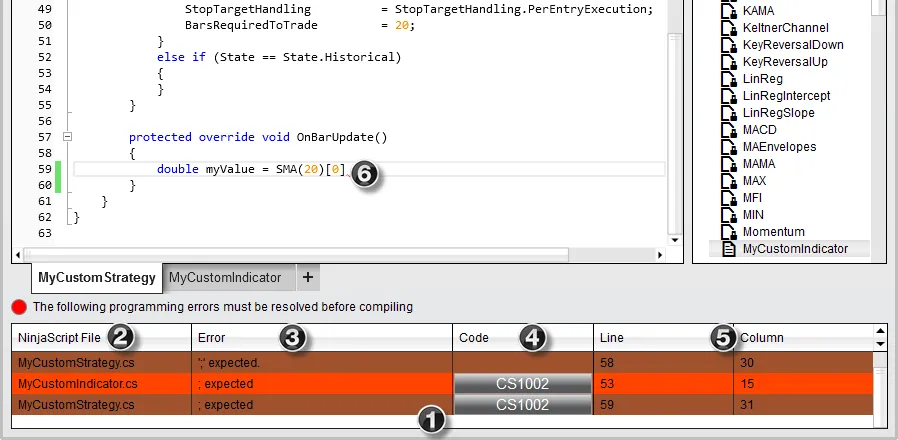
The image below illustrates a compile error
- Section where compile errors are displayed. Errors in the current loaded file are color coded a light color while errors in other files have a darker color code.
- The file that contains the error.
- A description of the error.
- A error code link that will open the Help Guide with any relevant error code information.
- Line number and column number of the error.
- Error is underlined with a red wavy line.
The error highlighted by icon (6) below shows that the expression is not closed with a semicolon. The expression should be: