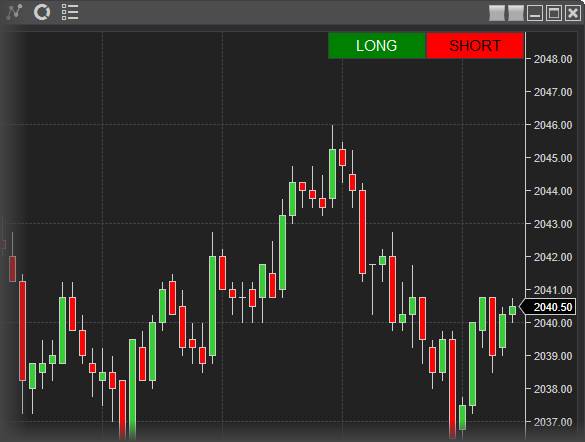
private System.Windows.Controls.Button myBuyButton;
private System.Windows.Controls.Button mySellButton;
private System.Windows.Controls.Grid myGrid;
// Define a custom event method to handle our custom task when the button is clicked
private void OnMyButtonClick(object sender, RoutedEventArgs rea)
{
System.Windows.Controls.Button button = sender as System.Windows.Controls.Button;
if (button != null)
Print(button.Name + " Clicked");
}
protected override void OnStateChange()
{
if (State == State.SetDefaults)
{
Name = "SampleAddButton";
Description = "Adds a custom control to the chart";
IsOverlay = true;
}
else if (State == State.Configure)
{
}
// Once the NinjaScript object has reached State.Historical, our custom control can now be added to the chart
else if (State == State.Historical)
{
// Because we're dealing with UI elements, we need to use the Dispatcher which created the object
// otherwise we will run into threading errors...
// e.g, "Error on calling 'OnStateChange' method: You are accessing an object which resides on another thread."
// Furthermore, we will do this operation Asynchronously to avoid conflicts with internal NT operations
ChartControl.Dispatcher.InvokeAsync((() =>
{
// Grid already exists
if (UserControlCollection.Contains(myGrid))
return;
// Add a control grid which will host our custom buttons
myGrid = new System.Windows.Controls.Grid
{
Name = "MyCustomGrid",
// Align the control to the top right corner of the chart
HorizontalAlignment = HorizontalAlignment.Right,
VerticalAlignment = VerticalAlignment.Top,
};
// Define the two columns in the grid, one for each button
System.Windows.Controls.ColumnDefinition column1 = new System.Windows.Controls.ColumnDefinition();
System.Windows.Controls.ColumnDefinition column2 = new System.Windows.Controls.ColumnDefinition();
// Add the columns to the Grid
myGrid.ColumnDefinitions.Add(column1);
myGrid.ColumnDefinitions.Add(column2);
// Define the custom Buy Button control object
myBuyButton = new System.Windows.Controls.Button
{
Name = "MyBuyButton",
Content = "LONG",
Foreground = Brushes.White,
Background = Brushes.Green
};
// Define the custom Sell Button control object
mySellButton = new System.Windows.Controls.Button
{
Name = "MySellButton",
Content = "SHORT",
Foreground = Brushes.White,
Background = Brushes.Red
};
// Subscribe to each buttons click event to execute the logic we defined in OnMyButtonClick()
myBuyButton.Click += OnMyButtonClick;
mySellButton.Click += OnMyButtonClick;
// Define where the buttons should appear in the grid
System.Windows.Controls.Grid.SetColumn(myBuyButton, 0);
System.Windows.Controls.Grid.SetColumn(mySellButton, 1);
// Add the buttons as children to the custom grid
myGrid.Children.Add(myBuyButton);
myGrid.Children.Add(mySellButton);
// Finally, add the completed grid to the custom NinjaTrader UserControlCollection
UserControlCollection.Add(myGrid);
}));
}
// When NinjaScript object is removed, make sure to unsubscribe to button click events
else if (State == State.Terminated)
{
if (ChartControl == null)
return;
// Again, we need to use a Dispatcher to interact with the UI elements
ChartControl.Dispatcher.InvokeAsync((() =>
{
if (myGrid != null)
{
if (myBuyButton != null)
{
myGrid.Children.Remove(myBuyButton);
myBuyButton.Click -= OnMyButtonClick;
myBuyButton = null;
}
if (mySellButton != null)
{
myGrid.Children.Remove(mySellButton);
mySellButton.Click -= OnMyButtonClick;
mySellButton = null;
}
}
}));
}
}