
NinjaScript Editor Components
Overview
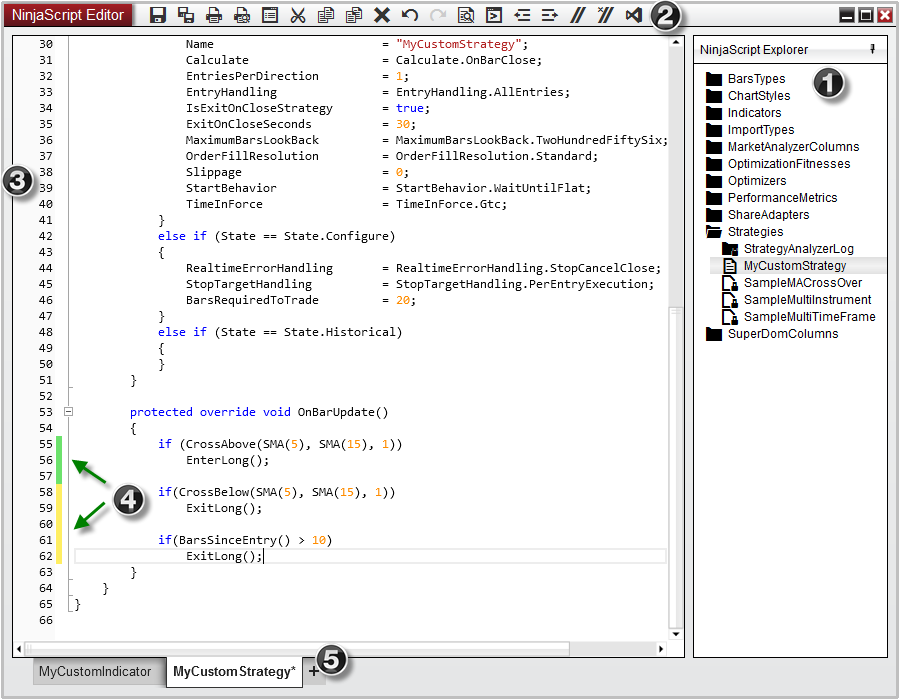
The NinjaScript Editor is a powerful scripting editor that allows you to create custom indicators, strategies, and any other custom NinjaScript types used to enhance the NinjaTrader platform. The NinjaScript Editor can be opened by selecting the New menu from the NinjaTrader Control Center. Then left mouse click on the menu item NinjaScript Editor.
- NinjaScript Explorer - Displays files, folders, and allows for additional file management
- Tool bar - Moving your mouse over each icon will display the function of the icon button
- Line numbers
- Line modification marking - Yellow flags indicate unsaved line modifications where green flags indicate saved modifications
- Tabs for creating new scripts via the NinjaScript wizard and working on multiple scripts.
Context Menus
Context menus can be opened by right-clicking in the NinjaScript Editor.
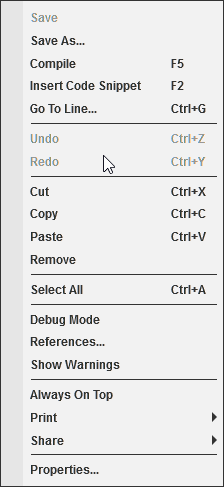
- Context Menu Items
Properties and Definitions
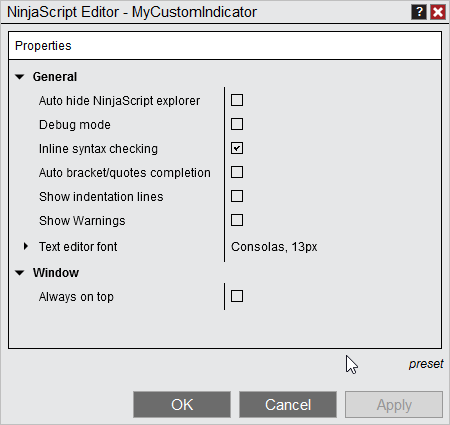
- General
- Auto hide NinjaScript explorer
- Sets if the NinjaScript explorer should be collapsed by default
- Debug mode
- Sets if a debug dll should be generated on compilation (see Visual Studio Debugging for more information)
- Inline syntax checking
- Sets if errors and warnings should be detected as code is written (without needing to compile)
- Auto bracket completion
- Sets if opening characters should automatically be appended closing characters. Works for (parentheses), [brackets], {braces}, <angled brackets>
- Show indentation lines
- Displays vertical lines for code formatting
- Show Warnings
- Sets if code warnings should be shown on compilation.