
NinjaScript Wizard

View as Markdown

The NinjaScript Wizard is used to generate the minimum code to get started programming any supported NinjaScript type. This wizard will allow you to define any default properties, add custom input parameters, add additional data series, and add any relevant event methods. There are a number of different properties and options available in the NinjaScript Wizard depending on the type of NinjaScript object you are creating.

The information on this page is to be used as a standard overview of the various components of the NinjaScript Wizard. For more information on NinjaScript methods and properties, please see the NinjaScript Language Reference section of our Help Guide.

Opening the NinjaScript Wizard

Creating a new NinjaScript file

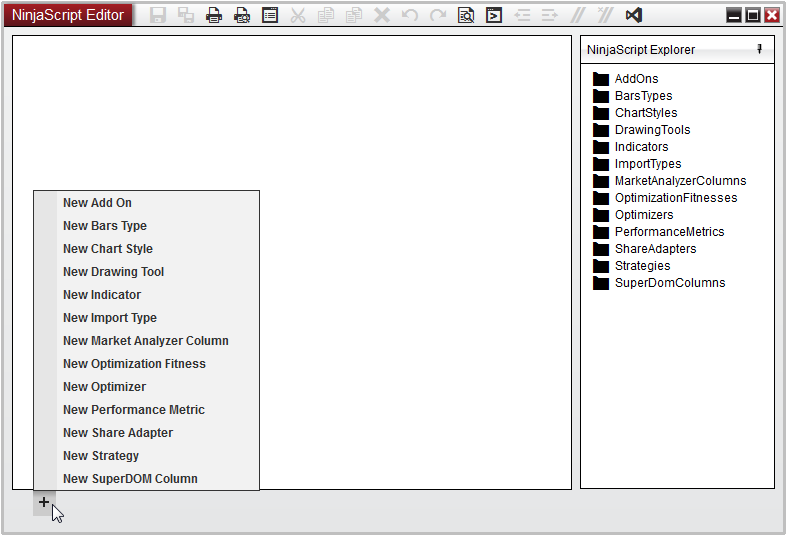
The NinjaScript Wizard can be opened from the NinjaScript Editor by selecting the + symbol on the tab row, and then selecting the NinjaScript object type you wish to develop.
ns_wizard_1

You can also right click on any of the NinjaScript categories listed in the NinjaScript Explorer and select “New…”

Understand the NinjaScript Wizard Display

Display Overview
ns_wizard_3

NameDescription
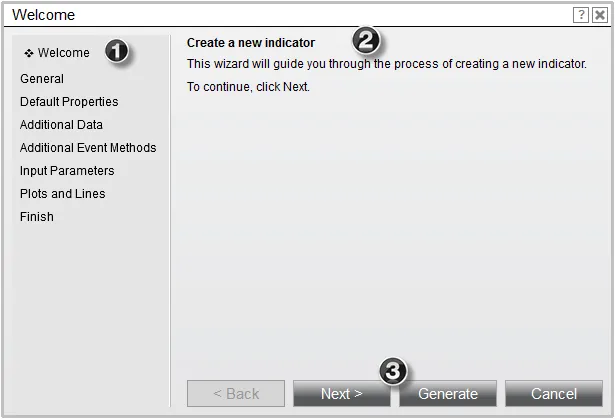
1. Wizard Navigation MenuUsed to navigate to various pages of the wizard. You can skip ahead or return to any page in the wizard at any time.
2. Wizard ScreenDisplays relevant information pertaining to the step of wizard you have navigated to and will provide instructions to help you define your script at various stages.
3. Wizard ControlsButtons used to perform various actions pertaining to the script that is being created. Selecting Generate at any time will exit the wizard and open your script in the NinjaScript Code Editor (Note: You cannot return back to the NinjaScript Wizard once the code is generated).

Understanding the Wizard Screens

Optional Pages

The NinjaScript Wizard has a number of different pages available used to define various steps of your custom script. Please note that the table below describes ALL of the pages available from the Wizard, but does not imply that these steps will be available for the script you are currently creating.

NameDescription
WelcomeThe first step of the Wizard, used to identify which type of object is being created
GeneralUsed to define a name and description to identify the NinjaScript file
Default PropertiesSets various properties and start behavior for the script being created
Additional DataUsed to optionally add additional data series such as minute, tick, etc or even custom series you may plan on calculating programmatically
Additional Event MethodsOptionally add additional event methods to your custom script, such as OnMarketData, OnMarketDepth, etc
Input ParametersUsed to define any public properties that may be used in your script
Plots and LinesOptionally add visual plots or lines to your script for charting purposes
FinishLast page of the Wizard, gives you a chance to go back and review each page if desired before finishing generating the script.